Why this post exists
Playing a video in a feed looks simple until you have to build it for real users.
Scrolling is continuous. Videos are heavy. Memory is limited. Network is unpredictable. Users scroll fast — faster than any video can realistically finish loading.
I learned this the slow way, building the feed and reels playback system for a video-heavy product across Android and iOS. What follows is what that system actually looks like, the decisions that shaped it, and the things that broke along the way.
This is not a tutorial. If you want a step-by-step walkthrough of Media3's APIs, the official docs do that well. This is the reasoning behind a system that's been running in production — what worked, what didn't, and why.
By the time content volume grew and short-form video became a real product priority, it became clear that reels wasn't a UI problem. It was a systems problem.
The problem
The shape of the thing is familiar — a vertical, infinite, snap-to-item feed, one video per item, Instagram or TikTok style. The expectation that comes with it is less forgiving than it looks:
- Zero perceptible delay when the user swipes
- Exactly one active player at any time
- No memory spikes, no matter how long the session runs
- Upcoming videos preloaded before the user gets to them
- Previously watched videos instant on scroll-back
- All of this on mixed content — single images, multi-image posts, reels thumbnails, and video, sharing the same scrolling surface
None of these requirements are hard in isolation. Together, under real scrolling behavior, they compound into a coordination problem.
The first wrong mental model
The first instinct is the obvious one: use ExoPlayer inside a RecyclerView, give each item its own player, let the system handle the rest.
It doesn't survive contact with a real feed.
A player per item means a decoder, a rendering surface, and a chunk of memory allocated for every visible (and sometimes off-screen) item. In a scroll-heavy environment, that adds up fast — and on lower-end devices, it doesn't just slow down, it becomes unstable.
Preloading went through its own series of wrong turns before landing on what's described in this post.
The first attempt was a second, background ExoPlayer instance — quietly preloading the next video while the visible player kept playing the current one. When the user scrolled, the idea was to hand off to that pre-warmed cache and skip the cold start. It worked in casual testing and fell apart under real analysis: cache misses kept happening, and the reason traced back to HLS itself. An HLS manifest carries multiple tracks — different video resolutions, different audio formats — and ExoPlayer's adaptive selection picks among them based on its own read of network conditions and device capability at that exact moment. The background player and the visible player didn't always agree. One would warm the cache with a 480p track; the other would ask for 720p when the user actually got there. Preloading every available track to cover every possible selection wasn't a reasonable trade — it would have meant downloading several times the data per video, most of which would never get used. This would have been a fine approach if the content were single-format MP4. It wasn't, and that mismatch was the whole problem.
The fix, on paper, was to stop guessing and force agreement: download the HLS manifest manually ahead of time, pick a specific video and audio track according to a fixed standard, record that choice locally, and make sure the real player selected the exact same track when the user arrived — using the same StreamKeys the manual download had used. This worked, and it solved the cache-miss problem completely. It also introduced two problems of its own.
The smaller one was operational: manually managing downloads against a fast-moving, visibility-driven scroll environment was fragile in exactly the way manually-managed concurrent state usually is — ghost buffers from cancelled downloads that hadn't actually stopped, download queues that needed careful timing to add and remove items from as the user scrolled. The first version handled the easy cases fine. Making it hold up under real-world scrolling — fast flings, varying network and device conditions — would have needed a level of tuning that felt disproportionate to the problem.
The larger one was structural: forcing the player to a specific, pre-chosen track defeated the actual point of adaptive streaming. HLS exists so the player can respond to real network and device conditions in the moment. Locking that choice in ahead of time, just to make preloading predictable, meant giving up the thing HLS was supposed to provide.
Media3's DefaultPreloadManager, when it became available, resolved both problems at once — not because it does anything fundamentally different under the hood (it's still downloading, cancelling, and managing queues, the same primitives), but because that infrastructure is built on real, accumulated handling of exactly these edge cases, integrated with the player's own track selection instead of working around it. Adopting it meant I could stop reinventing preload plumbing and put that effort into the part that was actually specific to this product — the sliding window strategy for an infinite feed.
The architecture
Here's the shape of the system that actually shipped, once the assumptions above were thrown out.
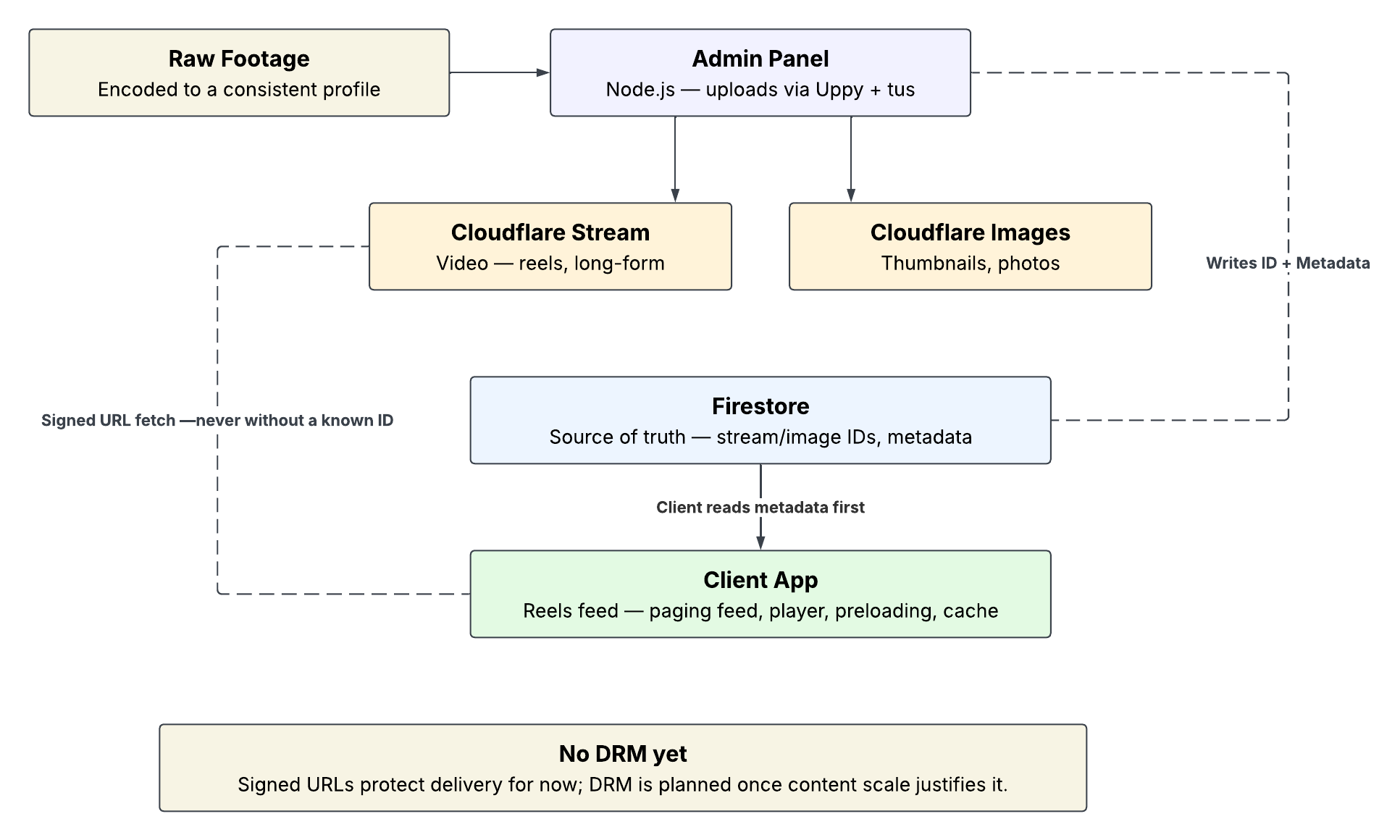
The client app is one piece of a larger system — raw footage gets encoded to a consistent profile before upload, an internal admin panel pushes it to Cloudflare Stream (video) and Cloudflare Images (thumbnails) via resumable upload, and the resulting stream IDs and metadata land in Firestore. The client never talks to Cloudflare without already knowing what it's looking for — it reads Firestore first, every time.
Inside the client app itself, the architecture looks like this:
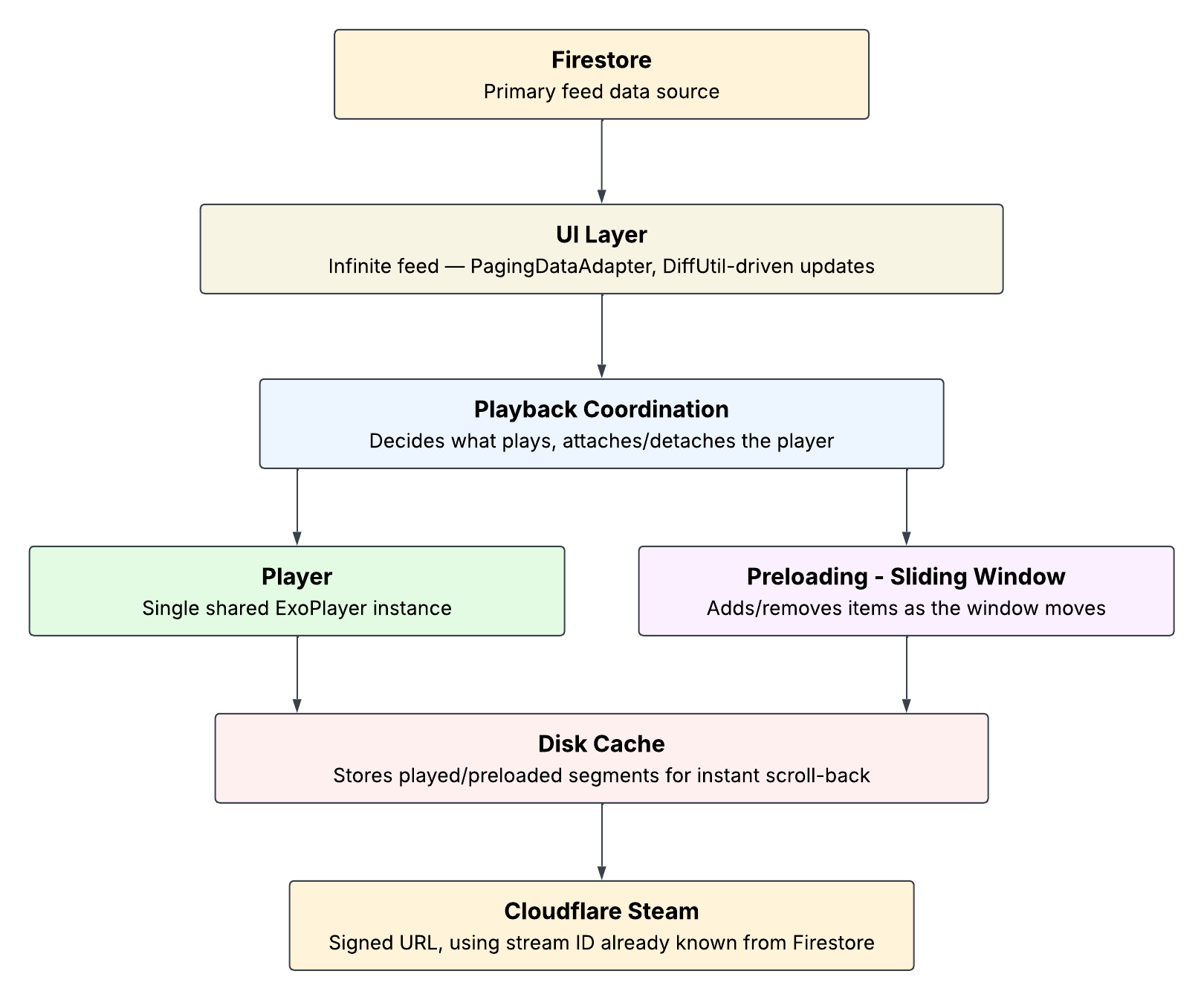
Each layer has exactly one job:
- UI layer — the paginated, infinite-scrolling feed
- Playback coordination — decides what plays and when, owns the attach/detach lifecycle
- Player — a single shared ExoPlayer instance
- Preloading — distance-based, forward-looking, sliding-window registration
- Disk cache — makes scroll-back instant
- Network — Cloudflare Stream, reached only with a known ID
No layer reaches past its neighbor. The coordination layer is the only thing that knows about both the player and the preload manager at once.
The most important decision: one player, not one per item
ExoPlayer is not a lightweight object. Every instance carries a decoder, a rendering surface, and real memory and CPU cost. In a scroll-heavy feed, instantiating one per visible item is the single fastest way to make the whole experience fall apart under real usage, even if it looks fine in a demo with three items.
The fix is a single shared player, reused across every item in the feed. The player doesn't belong to any individual view — it gets handed off, view to view, as the user scrolls:
PlayerView.switchTargetView(player, currentHolder?.playerView, newHolder.playerView)
player.playWhenReady = true
switchTargetView does the handoff atomically — detach from the old surface, attach to the new one, no dropped frame in between. This is the mechanism that makes "one player feels like many players" actually work.
The other half of this is making sure the player gets released cleanly when a view is recycled, not just when a new one is attached. RecyclerView can tear down a view independently of whatever your own scroll logic is doing — fast flings, aggressive view recycling, items dropping out of the cache. If the player is still silently attached to a view that's about to be reused for something else, you get exactly the kind of bug that's invisible in a quick test and shows up as a black flash or a wrong video three scrolls later:
recyclerView.addRecyclerListener { holder ->
    if (holder is ReelsViewHolder && holder == currentHolder) {
        PlayerView.switchTargetView(player, holder.playerView, null)
        currentHolder = null
    }
}
A smaller decision sits next to this one: PlayerView defaults to SurfaceView rendering, and I kept it that way rather than switching to TextureView. TextureView buys you more flexibility — animations, transformations, blending with other views — none of which the feed actually needed. SurfaceView is the more efficient choice for ExoPlayer rendering, and it keeps the door open for DRM-backed content later, which TextureView complicates. This is a recurring pattern in this system: favor the option that costs less at scale over the option that's more flexible in the abstract, when the flexibility isn't something the product actually needs yet.
The runtime flow: swipe to playback
This is the part that's hardest to get a feel for just from reading the class structure — what actually happens, in order, when a user swipes.
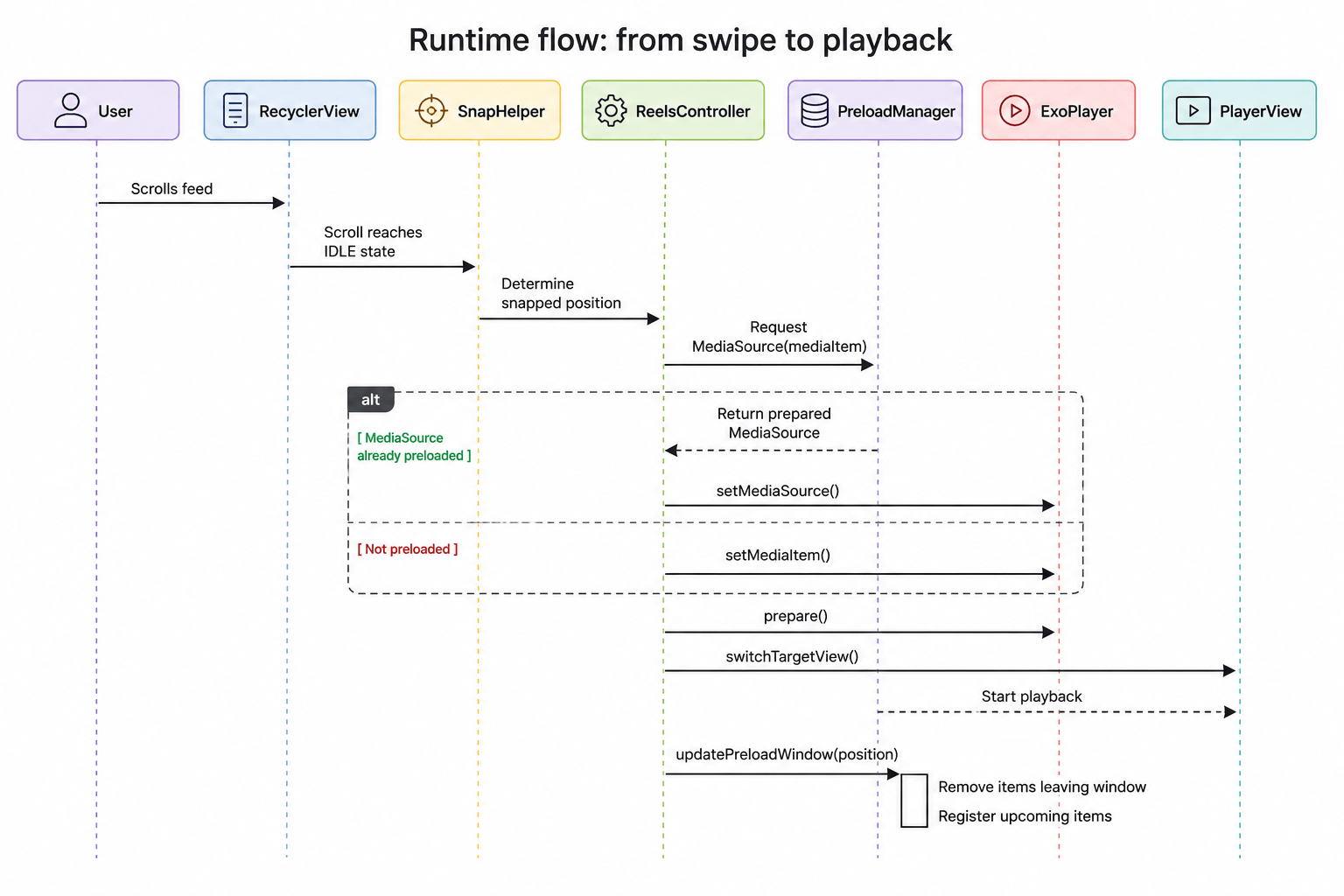
The trigger is the RecyclerView settling into SCROLL_STATE_IDLE — not while the user is still dragging, not mid-fling, only once the scroll has actually stopped on an item:
override fun onScrollStateChanged(rv: RecyclerView, newState: Int) {
    if (newState == RecyclerView.SCROLL_STATE_IDLE) {
        val snapped = snapHelper.findSnapView(rv.layoutManager) ?: return
        val pos = rv.getChildAdapterPosition(snapped)
        if (pos != RecyclerView.NO_POSITION) {
            playAtPosition(pos)
            reelsPreloadManager?.updatePreloadWindow(pos)
        }
    }
}
Waiting for idle, rather than reacting to every scroll frame, matters more than it looks. Attaching and detaching a player on every intermediate scroll position — while the user is still flicking through several items — wastes work and produces a visibly thrashing UI. Idle-only means the player only ever moves once per actual stop, which is both cheaper and the behavior a user actually expects.
From there, the coordination logic decides whether anything needs to change at all:
fun playAtPosition(pos: Int) {
    val player = playerProvider() ?: return
    if (pos == currentPosAdapter && player.playWhenReady) return

    val newHolder = recyclerView.findViewHolderForAdapterPosition(pos) as? ReelsViewHolder ?: return
    val item = adapter.getReelAt(pos) ?: return
    val newUri = item.hlsUrl.toUri()

    if (player.currentMediaItem?.localConfiguration?.uri != newUri) {
        val mediaItem = MediaItem.Builder().setUri(newUri).setMediaId(item.id).build()
        val mediaSource = preloadManager?.getMediaSource(mediaItem)

        if (mediaSource != null) {
            player.setMediaSource(mediaSource)
        } else {
            player.setMediaItem(mediaItem)
        }
        player.prepare()
    }

    PlayerView.switchTargetView(player, currentHolder?.playerView, newHolder.playerView)
    player.playWhenReady = true
    currentHolder = newHolder
    currentPosAdapter = pos
}
The branch in the middle — checking preloadManager?.getMediaSource(mediaItem) before falling back to setMediaItem — is where preloading actually pays off. If the preload manager already has a prepared MediaSource for this item, the player picks it up directly, skipping the cold-start cost of preparing a fresh source from scratch. If it doesn't — because the user scrolled somewhere unexpected, or preloading hasn't caught up — the player falls back to building it fresh. Same code path either way; preloading is an optimization the player benefits from when it's there, not a dependency it requires.
Preloading: a sliding window, not a guess
The early failures described earlier shared a common flaw — they tried to predict and pre-fetch content independently of the player's own pipeline. DefaultPreloadManager solves this differently: you register candidate items with it, and for each one, you tell it how much to load based on how far that item is from what's currently playing.
fun getPreloadStatus(index: Int): DefaultPreloadManager.PreloadStatus? {
    val distance = index - currentPlayingPosition
    if (distance <= 0 || distance > preloadForwardRange) return null

    return when (distance) {
        1 -> DefaultPreloadManager.PreloadStatus.specifiedRangeLoaded(3000L)
        2 -> DefaultPreloadManager.PreloadStatus.specifiedRangeLoaded(1500L)
        else -> DefaultPreloadManager.PreloadStatus.SOURCE_PREPARED
    }
}
The item immediately next gets real buffered seconds loaded ahead of time. The one after that gets less. Beyond the forward range, nothing — no wasted work on items the user probably won't reach in the next swipe or two.
This pairs with LoadControl, which governs buffering at the player level rather than the preload level — how much to buffer before playback starts, how much to hold once it's playing:
DefaultLoadControl.Builder()
    .setBufferDurationsMs(1500, 5000, 500, 500)
    .setTargetBufferBytes(50 * 1024 * 1024)
    .setPrioritizeTimeOverSizeThresholds(true)
    .build()
These two mechanisms operate at different layers and need to be tuned together — LoadControl decides how the active player buffers, PreloadStatus decides how much idle sources get loaded before they're ever played. Get one wrong relative to the other and you either preload too aggressively (wasted bandwidth, memory pressure from sources that may never play) or too conservatively (the preload work finishes too late to matter).
In a feed with a genuinely large or infinite item count, registering everything with the preload manager up front isn't viable — every registered source holds onto real buffers, and an unbounded registration list eventually becomes an OutOfMemoryError waiting to happen. The fix is a sliding window: as the current position moves, items entering the window get registered, items leaving it get explicitly removed.
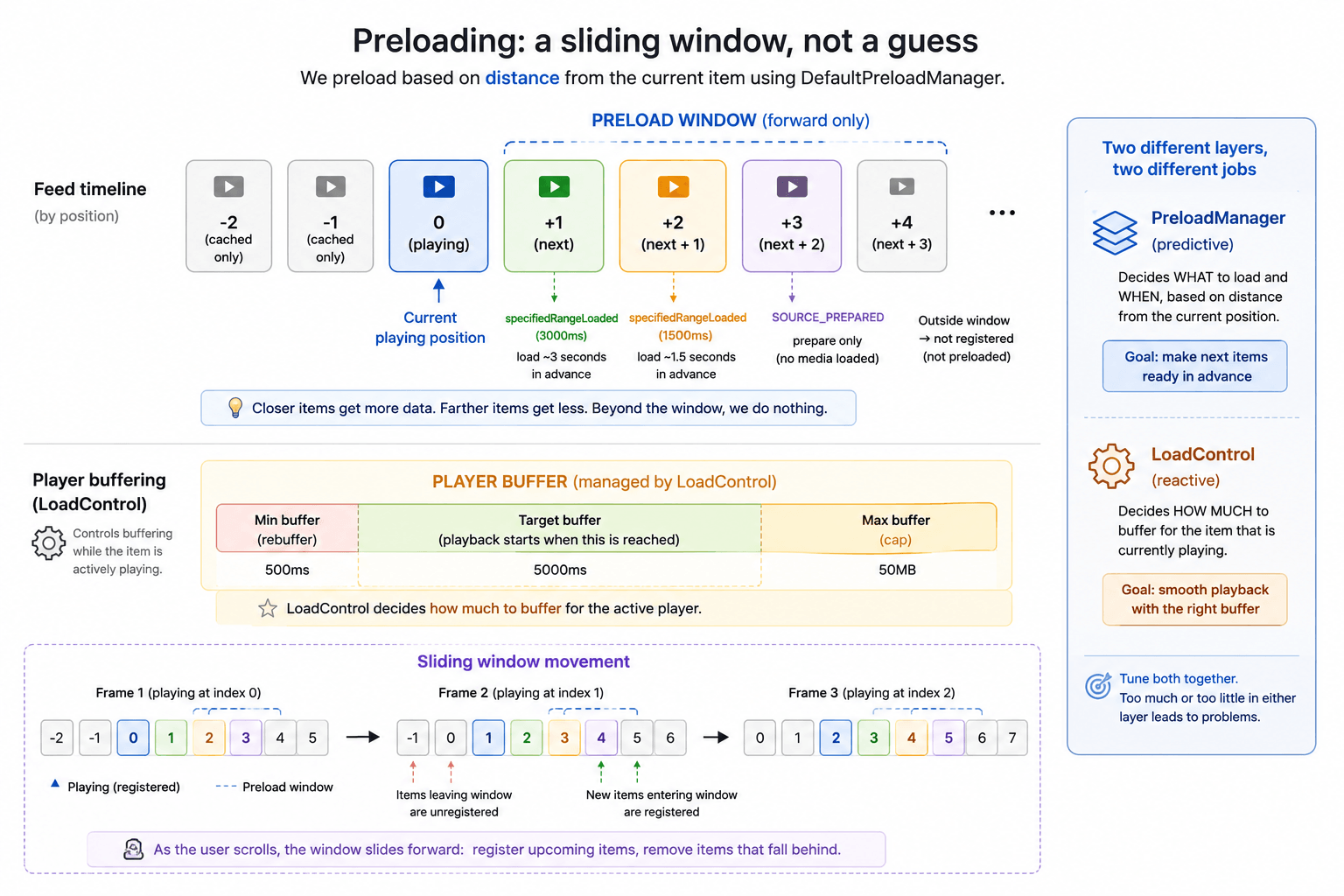
This is also where pagination enters the picture. The feed itself is backed by a PagingDataAdapter, with DiffUtil calculating minimal updates as new pages load in. The preload window and the paging window move together — new items appearing at the edge of the adapter are exactly the items that should be entering the preload window, and items falling off the front are exactly the ones that should be leaving it.
Encoding consistency was its own preloading problem
Preloading behavior wasn't only a code problem. For a while, it was inconsistent in a way that had nothing to do with the preload manager at all — some videos loaded almost instantly, others visibly lagged, with no pattern that pointed at any single bug.
The actual cause was upstream: videos were being compressed and uploaded with no consistent standard. Bitrate, resolution, and frame rate varied from one upload to the next, so "preload 3 seconds ahead" meant a very different amount of actual data depending on which video the user happened to land on.
Fixing this took real experimentation, not a guess. I tested a range of bitrates — 1200kbps up to 1800kbps — across both constant and variable bitrate encoding. Variable bitrate looked appealing on paper but needed meaningfully more complex handling to get consistent results; without that complexity, it just reintroduced the same unpredictability in a different form. Constant bitrate was the simpler, more predictable choice for a system where predictable preload behavior mattered more than maximizing compression efficiency for any individual video.
The final numbers — 1500kbps, 30fps — came out of that testing, and out of a conversation with stakeholders about what the product actually needed at that stage: fast, snappy start over maximum visual fidelity. That trade-off was a product decision as much as a technical one, and documenting the reasoning mattered as much as the number itself, since "why 1500kbps" is exactly the kind of decision that needs to survive being revisited later by someone who wasn't in the room.
Caching: making scroll-back free
Preloading only ever looks forward. Scrolling backward to something the user already watched is a different problem, solved by a different mechanism — disk caching, populated as a side effect of normal playback:
val evictor = LeastRecentlyUsedCacheEvictor(cacheSizeBytes)
val cache = SimpleCache(cacheDir, evictor, databaseProvider)

val cacheDataSourceFactory = CacheDataSource.Factory()
    .setCache(cache)
    .setUpstreamDataSourceFactory(httpDataSourceFactory)
    .setFlags(CacheDataSource.FLAG_IGNORE_CACHE_ON_ERROR)
Every byte that flows through this CacheDataSource — whether read because the user is actively watching, or because the preload manager fetched it ahead of time — gets written to disk automatically. There's no separate "cache this" step. Scroll back to something already played, and CacheDataSource serves it straight from disk, no network round-trip, no loading state.
This is a deliberate split: preloading is forward-only and network-driven, caching is backward-facing and disk-driven. Neither tries to do the other's job. The two systems don't even need to know about each other directly — they just both happen to flow through the same CacheDataSource.
Production Outcomes
The architecture above replaced something that worked in a demo but didn't hold up under real usage. The differences showed up in places that don't show up in a quick screen recording:
- Memory stayed flat across long scrolling sessions instead of climbing
- No playback overlap or cross-talk between items, even on fast, repeated scrolling
- Upcoming videos started with little to no visible buffering delay
- Scrolling back felt instant, because it was — no network call involved
- Less total network usage, since preloading was targeted instead of speculative
None of this shows up as a single dramatic before/after number. It shows up as the absence of the problems that used to be there.
What broke along the way
The preloading failures above were the real cost of this system — most of the actual time went into discovering why each attempt didn't hold up, not into writing the version that finally worked.
The deeper lesson sits underneath both the HLS track-mismatch failure and the encoding inconsistency: predictability has to be designed in from the start, not patched in after the fact. A preloading system that can't predict which track will be needed is fighting itself. A preload target measured in seconds is meaningless if the content behind it varies by 50% in bitrate from one item to the next. Both problems were really the same problem — something downstream assumed consistency that nothing upstream was actually guaranteeing.
That generalizes past preloading. Any feature decision made without asking what it needs to stay true as the product scales tends to surface as exactly this kind of quiet inconsistency later — not a crash, just behavior that varies in ways nobody can quite explain until someone goes looking for why.
Where iOS diverges
The same product requirement — smooth, fast, memory-stable reels playback — needed a different answer on iOS.
AVPlayer doesn't offer the same natural caching and aggressive-preload story that Media3 does on Android. Rather than force an Android-shaped mental model onto a platform that doesn't support it the same way, the iOS implementation uses a player-pooling approach instead — three players, forming a moving window around the active item, instead of one shared player with a forward preload window.
Same underlying mental model — a sliding window of "what's active, what's likely next, what's nearby" — expressed through a completely different mechanism, because the platform's actual capabilities are different. That comparison, and the iOS-specific decisions behind it, is its own post.
From UI thinking to systems thinking
The biggest lesson from this project wasn't a specific Media3 API or a particular optimization.
It was realizing that a reels feed isn't really about video playback. Playback is only one part of the system.
The harder problem is making everything around playback — loading, preloading, caching, recycling, and coordination between components — behave predictably while users scroll in completely unpredictable ways.
That's the point where a video feed stops being a UI feature and starts becoming a systems problem.
The open-source companion
To make the ideas in this post easier to explore, I built and open-sourced a reference implementation:
GitHub: android-reels-media3
The project demonstrates the core mechanics behind the architecture discussed here:
- Single shared Media3 player
- Snap-based playback switching
- Media3 PreloadManager integration
- Disk caching with SimpleCache
- Distance-based preloading strategy
The repository intentionally focuses on the playback system itself. It uses a fixed dataset and static preload registration to keep the architecture easy to understand and experiment with.
The production implementation described in this post extends the same concepts with paging, a sliding preload window, and additional lifecycle handling required for large-scale feeds.
If you’re building a reels or short-video experience on Android, the repository should provide a practical starting point for understanding how these pieces fit together.
What's next
A few follow-ups are planned from here: a closer look at the sliding window and the memory failure mode it prevents, the Media3 1.8.0 → 1.10.1 migration and what it changes, and the iOS reels architecture this post only briefly touched on.
GitHub: android-reels-media3